
Blog - foXnoMad

Find Free WiFi with WeFi
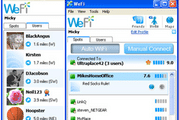
A good tool to install on your laptop when traveling across the country.

WeFi works like this: users install the WeFi client on their computer, then contribute data to the community by discovering open networks with the WeFi client. The client reports to WeFi headquarters, which then shares the open access point with other WeFi users. Aside from helping you find open hotspots, WeFi also has a social aspect that shows you where other WeFi users are.

WeFi is a free download [via Lifehacker] and combined with HotelChatter’s list of the best (and worst places) to get free WiFi can ensure you’ll be looking up porn writing emails to mom in no time. Avis offers wireless in their rental cars as well – just beware of ‘free’ access points in airports.

AirTran’s Fake Summer Sale

It works by raising rates in spring, only to lower them back to the regular price in the summer and call it a “sale“.

Monday, AirTran announced a so-called “System-Wide Summer Sale.” FareCompare.com looked at the price history and found that instead, AirTran had raised prices, then lowered them, calling the delta a “sale.”

To be fair, I don’t think that this practice is all that uncommon in other businesses as well, but we don’t really write about those do we? Check FareCompare and FareCast before you buy airplane tickets anywhere from any carrier.

Rice Salad At Room Temperature

Good timing for the first day of summer (today)!

Insalata di Riso, a simple salad of arborio rice mixed with tuna, olives, capers and other piquant ingredients. I usually toss everything together, cover the salad and let it rest for about an hour before serving. At that point, the rice is just slightly warm and all the flavors seem to be at their fullest.

You can find more cool-food recipes or share your own in the comments!

Reduce Skype Feedback on Your Laptop

Around here we love Skype, the free messaging program that allows you to call other computers with audio and video for free (and international landlines for dirt cheap). The only gripe is that sometimes feedback is noticeable on the line.

Lifeclever writes that this is usually due to the way microphones and speakers are positioned on laptops, easily remedied by changing the audio balance.

The microphone [in the Macbook Pro] is located under the left speaker grille, and can contribute to horrible feedback during a call (the person on the other side hears himself coming out of the speaker on your machine, fedback into your mic). I changed my speaker balance so that output was all to the right speaker, and the effect was fantastic.

Though the author uses the Macbook Pro as an example, the concept works for any laptop. Also, I’d recommend checking your network connection, or moving closer to your wireless router if the connection gets fuzzy. [via Lifehacker]

About Anil Polat

foxnomad aboutHi, I'm Anil. foXnoMad is where I combine travel and tech to help you travel smarter. I'm on a journey to every country in the world and you're invited to join the adventure! Read More

YouTube Twitter Instagram Facebook

Image Map

Image Map
10 Shares
Share
Tweet
Pin