Blog - foXnoMad

Small, Ergonomic, Revolutionary? A Review Of The Penclic R3 Wireless Mouse

The Penclic R3 Wireless Mouse is a rethinking of how you should use the gadget you probably touch most during a given day. Traditional mice put your arm in an unnatural position, causing wrist, elbow, shoulder, or even back pain from using one. Frequent traveling can make the situation even worse, especially if you’re working on hotel, cafe or tray tables in cramped spaces where you have to get into contorted shapes to type.

No products found.

I know the mouse isn’t the most interesting piece of technology to write about – they haven’t changed much over the past few decades. But as you can see in the video above, the Penclic R3 is really a creative design, put into a travel kit that’s small, light, and very ergonomic.

penclic r3 wireless mouse

The Penclic connects to your laptop with through a wireless USB dongle connection, has a battery life of about a month, and gives you precision hard to find in a traditional mouse. Getting used to the Penclic though will take some time but of all the ergonomic designs I’ve tried, this comes closest to real comfort in a size that’s actually practical for frequent travelers.

A 15 Year Old Explains How To Get Hamilton Tickets Easily For List Price

This is a guest post by 15 year old writer and #1 Potterhead Brian Selcik, a student at the Metropolitan School of the Arts. Brian has previously been a guest here before, writing how you can plan your very own Harry Potter tour in London. He also works for the Harry Potter Fansite MuggleNet and runs an Etsy shop where you can purchase hand knit goods.

hamilton broadway playbill

Hamilton is a great Broadway show that will live up to your expectations but you have to get your hands on some very elusive tickets first. For most people, finding Hamilton tickets isn’t easy or inexpensive but I was able to get tickets for my family and friends at list price, rather quickly, using a simple trick.

Here’s how I was able to get those most-wanted tickets for Hamilton on Broadway without paying an extra cent and how you can too.

Start Subscribing

I follow Hamilton’s Twitter page where they post a lot of Hamilton related content but also occasionally announce ticket specials. Those specials sell out very quickly so when I was actively looking for Hamilton tickets, I turned on notifications for all of the tweets from the Hamilton Twitter account.

1. To do the same, the first step is to follow @HamiltonMusical on Twitter.

hamilton broadway twitter

2. Now, activate notifications for all the Hamilton tweets so you can react fast when they have a ticket deal. To do so, click on the bell icon (it’s near their profile picture).

twitter notifications bell

3. Don’t forget to select ‘All Tweets‘ under Account Notifications.

twitter account notifications

This past spring I got a notification from Hamilton on my phone saying that a block of tickets would be released in 10 minutes for shows from November to January. I immediately followed the link they posted to their site to confirm what I was seeing – sure enough there were the tickets!

I clicked ‘Book Tickets‘ right away before the ten minutes to find they were already available. It’s important whenever Hamilton release a block of tickets on Twitter to check as soon as they announce it.

I called my travel partner and best friend, and confirmed that we were going to go. We quickly decided on a date and purchased our tickets for the list price ($200 per ticket). This may seem like a lot, but we chose great seats and tickets prices before this were ranging up to $5,000, so we were beyond thrilled.

hamilton play

Other, Less Reliable Options

You can also get email notifications by signing up through HamiltonBroadway.com. There will only be an option to enter your email if there are no tickets available. The email notifications are much slower that Twitter, so chances are you won’t be able to use them to get a ticket deal before they sell out. Liking the Hamilton Facebook page is another option but the least effective one if you are interested in taking advantage of ticket deals.

Hamilton was great, worth every bit the small effort I had to put in to find tickets at normal prices. Seeing Hamilton is a wonderful experience if you are planning a trip to New York City that won’t disappoint! Now you know how to get tickets to the show without having to pay the very high resale prices.

Thank you very much Brian for sharing your Hamilton travel trick with us! You can find Brian working behind the wizarding scenes of MuggleNet on Facebook and help support his next adventure by checking out his Etsy page.

How The DJI Drone Repair Service Works And How Much It Costs

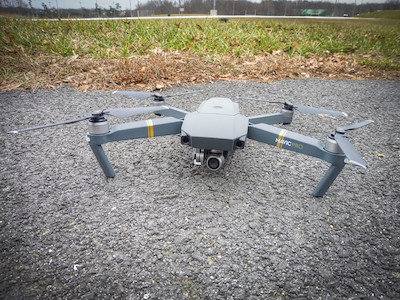
dji mavic drone

Get all the recreational drone laws worldwide on your phone! DroneMate app is now available for iOS and Android.

wifox ios app store     wifox google play android
Crashing a drone, even one with obstacles avoidance sensors like the DJI Mavic Pro, isn’t hard at all. Small falls from a desk can also put your drone out of commission, easily damaging the sensitive camera lens or gimble. For those of you with DJI drones, they’ve got a fairly polished repair service you’ll hopefully never have to use. But things happen.

Here’s how the DJI repair process works and whether or not it’s worth the hassle, cost, or time waiting.

Recover The Drone

First off, I’m writing about the repair process without any kind of warranty, such as the DJI Care repair and replacement plan. So here you are, you’ve crashed or otherwise damaged your DJI drone and wondering why you didn’t spend the extra $99 to get it insured. Whether you have the warranty or not, you need to retrieve the drone. It’s the reason you see people diving into rivers or me throwing car cushions at trees on YouTube to salvage what seems like a lost cause.

Once you’ve got your smashed, waterlogged, pathetic looking drone back, log into the DJI website, and head to the repair page.

Find A Service Center

DJI has authorized services centers in over 100 countries (they even list Yugoslavia – not sure what that’s all about). Pick the service center closest to you and select your specific drone (e.g. Phantom 4). The next few pages are where you describe the damage and how the accident occurred.

craiova drone top down

  • Don’t Lie – You might not know it but your drone keeps very details flight records (you can access from the DJI app). Every movement of the drone and controller input is recorded so forget about trying to make a crash seem like a manufacturer defect.

Choose whether or not the damage is a manufacturing defect or pilot error, remove the microSD card, pack up the drone, and send it to the DJI Service suggested to you.

  • Shipping Fees – DJI provide you with a shipping label, covering the shipping, but not packaging, costs.

The average shipping time is about a week, depending on where you’re shipping from of course.

Your Drone Knows A Lot About You

DJI has a repair tracking page whose only purpose seems to discourage you from sending them emails asking where your drone is. Once the technicians get a hold of your drone though, they email you a detailed record of what an idiot the exact events of the accident. Mine went something like this, which you can compare to the crash video below.

Unit was in P-GPS mode and was responsive to RC input; 2. At t=237.9s, relative height=7.1m, unit recorded external impact, then rolled over and fell. 3. User commanded full stick forward toward a tree in a parking lot until 1s before impact. User pressed left turn, backward, right turn, descent, and rightward 1s before impact but forward momentum carried unit to the tree. 4. Obstacle avoidance could not detect fine tree branches due to hardware limitation, especially during winter with no leaf on. Conclusion: User stick command error. Impact in air.

DJI Repair Costs

Obviously this will vary depending on your specific repairs but here’s a general breakdown of the costs, which is contained in that same email with the crash report.

  • Gimbal Camera Component: $101
  • Camera Flexible Flat Cable: $3
  • Back Left Motor Arm: $19
  • Gimbal Vibration Damping: $2
  • Gimbal Mounting Bracket: $1
  • Camera Co-axis Cable: $5
  • Front Left Motor Arm: $22

The service costs $65 an hour – the total work took two hours, added $130 to the cost.

  • Total Repair Cost: $283

Those of you who have DJI Care, if the crash is covered, you only pay up to the warranty. (Varies by drone but for example the Mavic replacement with DJI Care is $79 for the first drone; $139 for the second.) In the email DJI sends back with the costs, they have a Paypal link, where you can decide to pay for the repair or not. Repairs are not started until you make the payment and shipping costs are not charged unless you reject the repair.

Expect To Wait

Clearly, the camera is the most expensive component with labor adding the other bulk of the costs. I was surprised not to see the body, or other parts listed since there were major dents from the fall. I figured DJI would ignore what was probably aesthetic damage but happily surprised when the Mavic was finally shipped back from repair.

dji mavic pro camera gimble

  • Repair Time – Whatever the repair status page says, it will take about 4 weeks.

A drone repaired by DJI is essentially refurbished. There won’t be any signs of previous damage, scratches, or dents. Damaged parts are replaced and repairs are very thorough for the price, essentially 28% the cost of a new drone in this case.

Important: Calibrate Before You Fly!

You may have noticed a few nicks on the Mavic photos in this post and be asking yourself, hey, I thought he said there weren’t any visible marks?! Well, there weren’t when I originally got the Mavic back from DJI but I crashed it nearly immediately. It was indoors for a small test but the Mavic slowly veered left, hitting a wall, then I used the emergency controls to shut off the propellers. I was lucky to have dodged another trip to the service center.

dji calibrate

After looking at the flight records, I realized why the drone wasn’t hovering stably on a horizontal axis. Although DJI tests drones they repair before sending them back, it seems they don’t calibrate the Inertia Measurement Unit (IMU). The IMU orients the drone so when it’s not calibrated properly, it usually drifts.

  • Calibrate All The Things – Be sure to calibrate the compass, IMU, remote controller, and gimble prior to flying any drone you get back from repair.

The DJI repair process is a thorough, but slow, process. Best to avoid it altogether by doing these 12 things before you ever fly a new drone, which will go a long way to prevent a crash in the first place. Given how easy it is to damage your drone combined with the cost of repair makes getting the DJI Care plan all the more sensible. The DJI Care plans cost about 10% the full price of a new drone plus cover two replacement units over the first year – whether or not the damage is your fault. Since it’s a very cumbersome process to add the DJI Care coverage after you’ve purchased your drone (with no guarantees), keep it in mind and part of your budget when shopping.

What To Expect And How To Access The Internet In Cuba

plaza de la revolucion

There are few major cities in the world where you can sit down, open your laptop, and see absolutely no wireless networks available in the wifi list. That’s because the Internet is extremely restricted in Cuba so in many cases, even in Havana, it will be impossible to get online.

Connections that are available usually are slow, flaky at best, and you can’t simply hop on any wifi network you find. Internet access in Cuba works differently than most other places – here’s how to get online and what to expect in one of the least connected countries in the world.

The Government Decides Where The Hotspots Are

There’s a reason why only 5% of Cubans have access to the Internet in their homes. It’s a privilege reserved to those with money – something in Cuba you tend to only have a lot if you’ve got the right government connections or are a visiting tourist. There’s a tiny chance if you’re staying at a casa particular in Havana the Internet may be available to you. For the most part though you’ll have to head to one of the bigger international hotels.

In Cuba there are roughly 240 total Internet access points with 40 being located in the capital Havana. Hotels are the main point for Internet access around the country. (Although some parks have access points as well, they’re often not working or too unreliable to use.) As a general rule of thumb, if a hotel offers currency exchange from the Cuban Convertible Peso (CUC) to U.S. dollars (USD) or euros, there’s a good chance they’ll have an Internet connection as well. Most anyone you ask will know where the hotspots are or you can just look around in the evening for groups of Cubans lit by the glow of cell phones sitting right outside a hotel.

You Need An ETECSA Card

There are two primary ways to get online: using the ETECSA card (La Empresa de Telecomunicaciones de Cuba) or purchasing a voucher from a hotel. The latter is a rip-off I don’t recommend because a voucher is basically is an ETECSA card with a you-don’t-know-better fee costing you 2-5 times more.

cuba internet etecsa card

An ETECSA card gives you an hour of Internet for about $1.50 USD. (There’s also a 5 hour card for $7.50 that nobody seems to have.) After you connect to a given wireless network, you’ll need to enter the numerical username and password on the ETECSA card. It’s best to stock up on them since the cards are the gateway to your online access. ETECSA cards also work on those hotel networks who only offer vouchers. No matter where you are in Cuba, if there’s a wireless network, you’ll need an ETECSA card.

Remember To Logout

ETECSA cards are good for 60 minutes or 30 days, whichever comes first. Once you’re logged in and online using an ETECSA card, keep that particular browser window/tab open. ETECSA cards (hardly ever) log you out due to inactivity or when you close your browser, making them deceptively easy to unintentionally use up.

cuban flag slow motion

Don’t expect much from the Internet in Cuba when you get online however. The connections are inconsistent, ETECSA cards are moody when it comes to working, and at the best of times you’ll have a very slow connection. (About one megabit per second up and download speeds.) Surprisingly though, the Internet is pretty uncensored. You’ll be able to access nearly all foreign news sites, connect to VPNs – social media is open too.

Forget about Skype calls though due to the terrible connection; not just video but even audio calls are barely tolerable. A trip to Cuba won’t be what you think it is, but when you warn your friends and family you might be slow in replying to them, remember it’s hardly comparable to the lagging connections in western Europe. Plan on having practically no Internet connection at all, much like the 1950s Chevrolets, a throwback to consider enjoying while you can. Pores in Cuba’s iron border have begun expanding beyond the airport to include the World Wide Web too.

12 Things To Know Before Flying Your First Drone (So You Don’t Crash It)

Get all the recreational drone laws worldwide on your phone! DroneMate app is now available for iOS and Android.

wifox ios app store     wifox google play android

Drones offer a photographic flexibility no tripod can but are powerful, delicate aircraft that are surprisingly easy to crash. I learned this the fast, hard way, as you can see in the video above: by crashing a new DJI Mavic Pro right into a tree branch on my second day of flying. Despite being in an essentially empty parking lot, I still managed to down a drone equipped with obstacle avoidance sensors.

Drones sent back to DJI for repair are essentially refurbished, with nearly no visible sign of previous damage. Once I got the Mavic back, I flew it in a living room… for about a minute, before another (albeit) minor crash.

As I said, drones are very, very easy to crash, which is probably why we hear about it so often in the news. Since those first mishaps, I’ve flown successfully for hours, shooting travel videos around the world. Other times, I’ve taken the Mavic out to open spaces, pushing it to its limits in a variety of weather conditions. Those early crashes taught me a lot about how to avoid crashing. Here’s what I recommend to any new or inexperienced drone pilot about flying, to protect your drone, the people, and places you’ll be filming.

1. Start Small

arthurs seat drone photo scotland edinburgh

This is a hard piece of advice to follow admittedly, but if you’ve never flown a drone before, getting a serious machine like a Phantom 4 is akin to hopping into a Lamborghini right after receiving your driver’s license. Smaller drones like the Parrot Bebop 2 are more difficult to pilot since they lack the advanced stabilization features of more expensive models, giving you a very good feeling for quad-copter flight. They’re also less powerful, moving slower, staying lower, and being less expensive, not as costly if you make a mistake.

2. Read The Entire Manual

mavic drone camera gimble

Whether or not you completely ignored the first piece of advice above – read the entire manual of any drone before using it. Learn the controls and practice them, with everything turned off. When I first hit a tree, I attempted to turn left out of the way. All I ended up doing was rotating on an axis because I knew the controls but wasn’t familiar enough to use them unconsciously. You need to be able to use the drone controls without having to think about them, like riding a bike.

  • Particular Features To Review Well – Return-to-home functions, emergency shutoff, pause buttons, can all get your drone out of trouble quickly. Hopefully you’ll never have to use any of these functions but knowing about them can protect you as well as other aircraft and buildings against collisions.
  • Don’t Rely On Automated Avoidance Systems – A good feature in concept but in practice, they only detect large, solid objects. Obstacle avoidance is a good fail-safe but never assume its going to save you from smashing into things.

3. Don’t Fly Indoors

writers musuem edinburgh

Drones are hard enough to fly outdoors. Many people think the propellers of a drone will power through a small nick of a wall but what really happens is as soon as they touch anything, it’s game over. Indoors there are more obstacles to hit plus walls dampen GPS signals. Depending on the drone you have, losing a GPS signal can mean your drone switches back to a less accurate positioning system (e.g. ATTI mode on some DJI models). At best the drone will drift a meter or two horizontally – not a problem in most cases outdoors – inside though it could easily run you into a wall.

  • Return To Home Trouble – Many drones have a ‘return to home’ function that’s activated when the drone loses signal with the remote. Typically, there’s some preset altitude the drone will ascend to in order to avoid obstacles, then try to fly back to where it took off. You don’t want ‘return to home’ to be activated indoors since the drone might shoot right up into your ceiling. Yes, you can turn off return to home or set the drone to simply hover if it loses a connection, either way you’re still taking a big risk of an indoor collision.

4. Become Familiar With The Drone App

dji mavic drone app

Now that you’ve become a bit familiar with the remote controller, it’s time to power it on and the drone. Don’t take off yet. Many drones use a mobile app to give you a large variety of flight and video controls. Since your drone app probably won’t be fully functional with the drone turned off, keep it on the ground, power on, and become very familiar with the options. Set the important features: return-to-home (set default altitude as high as allowed), maximum altitude, distance, enabling beginner mode if available.

  • Simulator – A lot of drone apps (DJI, for example) have flight simulators built-in. Simulators are a fantastic way to get comfortable with flight controls while getting a feel for the drone’s sensitivity, without any risk.

5. Respect The Weather

loch ness drone

All manufacturers list maximum wind conditions you shouldn’t fly in. I have tested the Mavic Pro in winds higher than are recommended and found unless you are flying in winds much stronger (double or triple) the recommended maximums, it probably won’t bring your drone down. What wind does though is noticeably move the drone on its horizontal axis making it much easier to hit nearby objects. Especially difficult become landings – the stronger the wind the larger the landing area you’ll need to touch down safety. Beginner pilots should stick to calm skies only when starting out, and no matter how experienced you are, be aware of the risks of going over recommended limits.

  • Rain – Unless your drone is waterproof, don’t push your luck by flying in wet conditions as it’s quite dangerous. A battery that shorts out in midair can turn your drone into a small rock falling from the sky.

6. Learn The Laws

udvar hazy museum

Contact your local, then national, aviation administration if they don’t already have the relevant drone laws listed online. My app, DroneMate, has all of the recreational drone laws around the world updated continuously. It’s available for iOS and Android.

7. When Flying, Avoid Pushing Control Sticks Full Throttle

dji mavic remote controller

This is important: be gentle with the controls! Most drones have powerful motors guided by sensitive joysticks. Drones can move sharply with light touches and really take off if you hit the gas push the sticks all the way in any direction. Many drones have some options for reducing the sensitivity of the controls. Personally, I don’t like doing so in the case I need to maneuver quickly (seagulls are not your friend) but many other drone pilots prefer to keep the controls toned down.

  • Sports Mode: If your drone has one, make sure it’s off. Every time.

8. Fly In Wide, Wide, Open Spaces

drone photo edinburgh

Flat lands with nothing around for as far as you can see are ideal.

9. Practice Moving Vertically, Then Horizontally, Then Both

loch ness aerial

Get comfortable going up and down first because it’s the easiest direction to navigate in most situations. Then take baby steps moving forward, backward, left and right. Once you’re comfortable manipulating vertically, then horizontally, independent of one another, you can begin combining the two. Slowly, of course.

10. Generally: The Higher, The Better

campina lake

Speaking broadly, the higher up you’re flying (as close to the legal limit, of course), the safer your drone is. There are few things to hit at altitude despite our tendency to feel safer flying closer to the ground. Practice honing your instinct so you go up when flying across areas, or have obstacles in your way. Going over, not around, objects is a mentality that can take time to internalize.

  • Birds – As a general rule, birds don’t bother things above them. Try not to fly underneath birds. If you see a hawk or eagle, it’s best to land, as they might mistake your drone for a stupid, slow bird meal. Seagulls have a habit of chasing drones while crows tend not to bother them if they’re alone. Groups of crows (called a “murder”) grow bolder, seemingly daring one another to “try and kick that thing out of the sky.”
  • Wind Drafts – Drones hover unless you fly them otherwise. Birds do not hover. Updrafts, common around mountains, cliffs, and hills will send gliding birds up and down. Be conscious of how the winds are flowing since any nearby birds will move in the same direction.

11. Look At Your Drone, Not The App

loch ness drone photo

After some successful flights, you’ll feel more at ease navigating with your drone app, as opposed to visually maneuvering it. Although drone apps typically have GPS maps, direction readings, and other very useful information, it can be tricky to look down at your remote controller too long before you get the hang of basic flying.

  • Directional Guidance – Drones that are high up in the sky can be difficult to orient by eyesight. Most drone apps have a directional arrow showing you which way the drone is facing relative to you. Being aware of this feature – and finding it – is why you practiced so much with the app before ever flying.

12. Landing Is The Hardest Part

mavic drone landing pad

The first step for a good landing is to have a good takeoff point. In calm conditions, the size of the landing pad should be at least twice the width of the drone itself. Give yourself more space if there’s wind, remembering not to force a landing if the drone moves in a gust as you’re coming down. Take your time landing and make things easy for yourself by choosing an area without any stones, high grass, or other obstacles around.

Take Things Slow

This may seem like a rather long post about not crashing your drone but the truth is there are many ways an accident can occur – most of which are caused by pilot error. You can avoid trouble by thinking like an airline pilot: know the machine you’re flying well, give everything a width berth, focus on safety, and don’t fight the flying conditions.

Remember to learn how to fly, then work on using your drone as a camera. Once piloting the drone becomes second nature you’ll be able to concentrate on creating wonderful travel videos from your trips.

The Bags And Other Non-Electronic Gear I Travel With (And Highly Recommend For Travelers)

osprey sojourn 60

I carry a lot of electronics and when I recently posted all of the gadgets I travel with, many of you sent me messages asking what that gear was kept in. We often focus on the complex items, forgetting about the simple, yet critical bags, covers, and cases that protect our valuables.

These are the road-tested, non-electronic items I have used, in some cases for years, and would recommend for your travels as well.

Luggage: Osprey Packs Sojourn Wheeled Luggage, 60L

osprey sojourn

The Osprey Sojourn 60L is a good medium between the larger 80L and compact 45L versions. The “L” is for liters of volume, roughly 63.5 centimeters (25 inches) by 35.56 cm (14 in) by 35.56 cm. It’s a roller; which I find preferable to a backpack so if you have another smaller backpack you don’t have to wear both in the “double turtle” tourist configuration. The Sojourn 60L does have backpack straps if you need to carry it on your back (a feature I’ve rarely used) but more useful are the interior compression straps. Those make it much easy to keep your belongings from dancing about, plus takes pressure off the exterior zippers. I have used the same Osprey Sojourn 60L for years, on hundreds of flights, over 6 continents, and they hold up incredibly well.

Electronics Backpack: SwissGear 1900 Scansmart Laptop Bag

swissgear smartscan 1900 laptop bag

This backpack has 15 pockets and comfortably holds all of my electronics, including the DJI Mavic Drone. Made of 1200D ballistic polyester fabric; I used a smaller version, the Wenger Synergy for over 12 years – only changing to the larger SwissGear 1900 to accommodate the addition of a drone.

Daypack: Osprey Daylite

osprey daylite

Carrying around a bag full of all your gadgets isn’t practical or very wise so for days out exploring. Fitting nicely into the Sojourn, the Osprey Daylite (22.86 cm x 22.86 cm x 45.72 cm) is an ideal size for a day pack, trips to the gym, or jiu-jitsu classes. It can carry a DSLR, Mavic Drone, gym clothes, though not all at once, it’s close. Weighing only 426 grams (.94 pounds) with a ventilated back panel, the Daylite is comfortable, small, plus has compression straps for times you need to push its capacity.

Cable Organizer: Cocoon Grid-It 10.5 x 7.5-Inch Organizer

I had put off organizing my cables for a long time but after another time in airport security having to pull out a clump of cords, send them back through the X-ray, and attempt to shake all the tangles out I decided on the Cocoon Grid-It, 5 x 7.5 inch organizer. It’s about the size of a standard sheet of paper with a very slim profile, plus its designed in a way that you don’t need to be very organized to make use of the Cocoon’s organizational benefits. Put the cable where they fit, then be on your way.

Toiletry Bag: SwissGear Deluxe Framed Toiletry Kit

swissgear deluxe toiletry kit

SwissGear make very durable products that are well thought out in design to an extent it’s easy to forget how useful they are. The main pockets of the SwissGear Deluxe Framed Kit are lined with rubber to make them water-resistant – ideal for packing deodorant, perfumes, shampoos or anything else you don’t want leaking into your luggage.

Drone Carrying Case: SwissGear Hanging Toiletry Kit

swissgear hanging toiletry kit

For those of you looking into a drone to travel with, the DJI Mavic Pro is a good combination of size (it’s collapsible) with excellent video quality (shoots 4K). Many of the hard cases sold for the Mavic are big, adding unnecessary bulk to a drone designed to be small. The SwissGear Hanging Toiletry Kit, odd as it may seem, is a soft case that perfectly fits the Mavic (in its sleeve), the remote controller (in the Altura Small Neoprene Pouch Bag), and charging cables nearly perfectly.

Laptop Sleeve: Incase Icon Sleeve

incase icon laptop sleeve

The Incase Icon Sleeve is a soft cover made for a number of laptops and what I keep my Macbook Pro in. The Incase has saved my laptop from what could have been a devastating fall at airport security, protecting it from the effects of traveling.

Wallet: J.Fold Men’s Roadster Torrent Slimfold

jfold wallet

Slim, durable, and as you may have guessed by now, with plenty of pockets.

A Few Other Covers And Cases

I don’t want to neglect mentioning the Moleskine Classic (5 x 8.25) Notebook. Although I tend not to be loyal to a particular notebook brand, I can recommend the Moleskine (5 x 8.25) because of the large writing surface for a compact journal. (The pages also fold flat; i.e. no gigantic hump when you’re writing in the middle of the notebook.)

Lastly, for my Panasonic Lumix DMC-ZS45 camera, I use an off brand, particularly mundane looking black case. Another benefit to cases are they can reduce the perceived value of what’s in them and uglifying your gadgets when they’re public can make them less enticing for pickpockets. Like any good case or backpack, you want something functional, not much bigger than the things it’s carrying, with of course, plenty of pockets.

About Anil Polat

foxnomad aboutHi, I'm Anil. foXnoMad is where I combine travel and tech to help you travel smarter. I'm on a journey to every country in the world and you're invited to join the adventure! Read More

YouTube Twitter Instagram Facebook

Image Map

Image Map
10 Shares
Share
Tweet
Pin